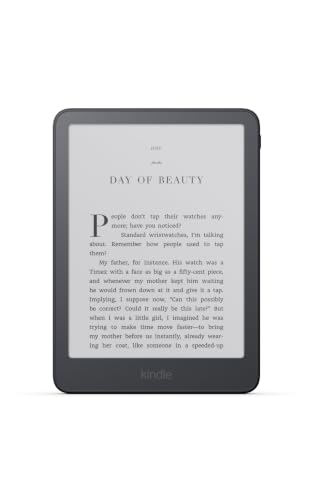
If you want one Kindle that does the main job well and nothing else, the 2026 Kindle Paperwhite is where most shoppers should start. It is the model Amazon built its fall refresh around: a larger screen than earlier Paperwhites, a flush front, a warm light, waterproofing and a battery that lasts for weeks. This page walks through what Amazon says about the device, who will be happy with it, and where another model makes more sense. For the whole field, see our ranking of the best e-readers of 2026.
We have not handled this device, and we take no measurements of our own. What follows compares the published specifications and Amazon’s own descriptions, along with the questions buyers ask most often. Where Amazon has not published a number, we say so instead of guessing.
What Is New in the 2026 Paperwhite
Amazon announced its refreshed Kindle lineup on October 1, 2026, and the devices began shipping on October 28, 2026. According to Amazon’s announcement, the new Paperwhite has the largest display of any Paperwhite so far and the highest contrast ratio of any Paperwhite. The panel uses an oxide thin-film transistor backplane, a technology Amazon points to for sharper-looking text and faster page turns. Amazon also says the device is thinner and lighter than the previous lineup, though the announcement does not give exact dimensions or weight, and we will not guess.
Two other points matter for everyday reading. The front light is adjustable and warm, so you can shift from a cool white during the day to an amber glow at night. And the device is waterproof, which has been a Paperwhite staple for years but still counts: an e-reader that survives a splash is one you will actually take to the pool.
The model we picked here is the Graphite version with 16GB of storage, as listed by Amazon. The standard Paperwhite comes with and without ads on the lock screen. Check the listing carefully before you order, because the two versions are priced differently on Amazon.
Display and Reading Comfort
The Paperwhite’s screen is a glare-free E Ink display, which means it reads like printed paper in a sunny window, not like a tablet that turns into a mirror. That has been the central argument for dedicated e-readers since the first Kindle, and it still holds. Because the screen reflects ambient light instead of emitting it, many readers find long sessions feel different from reading on a phone, though comfort varies from person to person and we make no health claims.
The 2026 version is a flush-front design. In practice that means the glass sits level with the bezel, so there is no raised lip to collect dust or crumbs, and the edge of the screen feels smoother under your thumb. Amazon’s announcement describes the screen as the largest on a Paperwhite, but the page does not state the diagonal in inches or the pixel density. If those numbers matter to you, confirm them on Amazon’s product page before ordering.
Font controls are one of the Kindle’s quiet strengths. You can change typeface, size, bolding, line spacing and margins, which matters for readers who want large text without moving to a bigger device. If you are weighing a big-screen model mainly for font size, try raising the font on the Paperwhite first, and read our guide to e-readers for adults who want a big screen for the trade-offs among 6-, 7- and 11-inch screens.
Battery Life and Charging
Amazon says the 2026 Paperwhite can last up to 12 weeks on one charge. That figure assumes a fairly modest amount of daily reading with the light at a low setting and wireless turned off between uses, so treat it as a ceiling, not a promise. A reader who spends an hour a night with the light on will charge far less often than a phone user, but probably more often than the headline number suggests.
The announcement does not specify the charging method for the standard model. The Signature Edition, by contrast, is listed with pogo pin dock charging. If dock charging is important to you, that is a reason to look at the Paperwhite Signature Edition (2026) instead.
Who Should Buy the Paperwhite
The Paperwhite is a strong match if any of these describe you:
- You read mostly novels and nonfiction and want a screen that behaves like a page.
- You read in bed, on planes, by the pool or in the bath and want waterproofing.
- You want a gift that works out of the box for a parent, a teenager or a friend who has never owned an e-reader.
- You borrow from the library through Libby and want a simple way to get those loans onto a device.
- You want a Kindle that will last several years and do not need color or handwriting.
It is also a sensible stepping stone. Readers who start here and later decide they want to annotate documents can move up to a Kindle Scribe, and readers who discover they love comics can look at a color model. Starting with a Paperwhite keeps that decision low-risk.
Who Should Look Elsewhere
A few readers will be happier with something different.
If you read many comics, cookbooks, children’s picture books or magazines, a black-and-white screen will flatten what makes those books special. A color E Ink Kindle is the better fit, and our Kindle Colorsoft (2026) profile explains how Amazon’s color display works and what it costs you in contrast and battery.
If you want to write notes by hand, mark up PDFs or keep a notebook, the Paperwhite will not do that, and the Kindle Scribe lineup exists for exactly that job.
If you dislike Amazon’s ecosystem, or you want to read EPUB files from other stores without conversion, a Kobo is a better fit. We cover the Kobo options in the main e-reader ranking.
If you want the quietly premium extras, namely the aluminum back, the auto-adjusting light and extra storage, the Signature Edition is the model Amazon built for you.
Storage: Is 16GB Enough?
Sixteen gigabytes sounds modest by phone standards, but e-books are tiny. A typical novel is well under a megabyte of text, so 16GB can hold thousands of titles before space becomes a concern. The limits show up when you load a lot of audiobooks, which are much larger files, or a library of image-heavy comics and graphic novels. If you plan to do either, the 32GB Signature Edition gives you more room, and you can always keep the full library in Amazon’s cloud and download only what you are reading.
Ads, Accessories and Ownership Costs
The Paperwhite you see in a promotional photo is not the whole cost of ownership. A few items are worth planning for before you check out:
- Ads or no ads. The ad-supported version shows promotional images on the lock screen. The ad-free version costs more. Neither version puts ads inside your books.
- A cover. Amazon sells covers, and third-party options are plentiful. A cover protects the screen in a bag and is a natural pairing for a gift.
- A charger. Many households already have a USB-C power adapter. If yours does not, add one.
- Content. The device itself is the entry fee. Plan on buying books, borrowing from the library, or using a subscription such as Kindle Unlimited if you read heavily. Library borrowing through Libby is free with a library card.
Because we do not list prices on this site, use the button below to see the current price and the exact configuration, including the ad option and color, on Amazon.
How It Compares With Its Neighbors
Within Amazon’s own lineup, the Paperwhite sits in the middle. Below it, the entry Kindle is smaller and less expensive. Above it, the Signature Edition adds storage, an aluminum back and an auto-adjusting light; the Colorsoft adds color; and the Scribe adds a large screen and a pen. On paper, the Paperwhite offers the best balance of screen size, waterproofing and battery life for the typical reader, which is why we rank it first.
Against Kobo, the picture is more about ecosystem than hardware. Kobo’s readers handle EPUB files natively and have library borrowing built in, while Kindles use Amazon’s store and Libby delivery. If you buy most of your books from Amazon already, the Paperwhite is the path of least resistance.
Bottom Line
The 2026 Kindle Paperwhite is not flashy, and that is the point. It gives you a bigger, higher-contrast display than earlier Paperwhites, a warm light, waterproofing and a battery measured in weeks, all in a body Amazon says is thinner and lighter than before. If you read mostly text and want a dependable device for years, it is the right place to start. If your reading leans toward color, handwriting or premium materials, use the links above to check the neighboring models first.
See price on Amazon
Sources