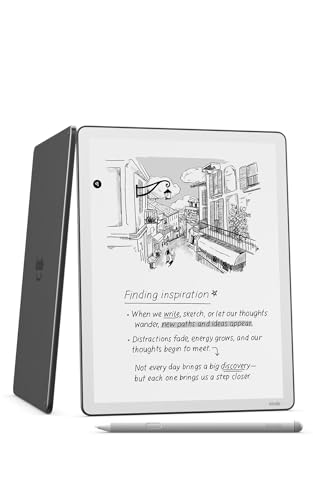
The Kindle Scribe is the Kindle for people who also want to write. It combines an 11-inch E Ink display with a pen, so one device can hold your library, your documents and your handwritten notes. This profile covers what Amazon says about the 2025 Scribe, what the large screen is good for, and who should skip it. To see where it ranks among our picks, read our best e-readers of 2026.
We compare published specifications and Amazon’s descriptions. We have not taken any measurements ourselves. When Amazon does not publish a figure, we say so.
The Hardware, According to Amazon
Amazon introduced the redesigned Scribe lineup on September 30, 2025, and Notebookcheck calls the standard model the 2025, third-generation Scribe. According to Amazon, all models share an 11-inch glare-free display with paper-like proportions, a body that is 5.4mm (about 0.2 inches) thick and weighs 400g (about 14 ounces), and a new quad-core chip with more memory. Amazon says the device is 40% faster for writing and page turns than before, and that a rearchitected display stack reduces parallax, the tiny gap between the pen tip and the ink, to virtually nothing. The standard Scribe has a front light built from miniaturized LEDs, with a narrower bezel and more uniform lighting. The glass is texture-molded to give the pen more friction, which Amazon says feels closer to paper.
The pen attaches to the device and never needs charging, according to Amazon. Amazon’s 2026 buying guide adds that the Scribe comes with a Premium Pen with an eraser, though the exact pen in your box depends on the configuration you choose.
Amazon does not publish a pixel density or storage options on the pages we opened. The configuration we picked is a 32GB model, per the product listing. If resolution matters to you, confirm it on Amazon’s page.
Reading on an 11-Inch Screen
For books, the Scribe’s size cuts both ways. Text looks generous, and you can fit more words on a page at a comfortable size, which suits people who prefer larger type without cramming. Comics, PDFs, sheet music and textbooks with figures are much easier to read at this size than on a 6- or 7-inch Kindle. Our guide to big-screen e-readers compares the three sizes in more detail.
The trade-off is portability. At 14 ounces, the Scribe is heavier than a typical paperback and noticeably heavier than a Paperwhite. It is closer to a tablet than a pocket device. If you read mostly in bed or on a commute, with one hand, the Kindle Paperwhite (2026) is easier to live with.
Writing and Notebooks
This is what you are paying for. Amazon’s description of the new home screen includes Quick Notes and recently opened books, documents and notebooks, and a Workspace feature that keeps related documents, notebooks and books in one folder. A shading tool lets you add gradients and tones to sketches. You can write directly in notebooks, on imported documents and, according to Amazon’s buying guide, in books through a feature called Active Canvas that keeps your notes anchored to the text when the layout changes.
Because the Scribe is black and white, you cannot color-code. If you want that, see the Kindle Scribe Colorsoft profile, which adds 10 pen colors and 5 highlighter colors.
Documents and Sharing
Amazon says you can import documents from Google Drive and Microsoft OneDrive, and export annotated PDFs. Notes can be exported to OneNote as converted text or as an embedded image. For students and professionals who live in PDFs, those export routes can make the difference between a fun device and a useful one. Amazon’s page does not list file formats, so confirm supported types before buying if you rely on a specific one.
AI Features
Amazon lists several AI-based features for the lineup. AI-powered notebook search looks across your notebooks and can produce simple summaries and answer follow-up questions. Send to Alexa+ lets you send notes and documents to Alexa+ for conversation, and Amazon says it is US only. Two reading features, Story So Far and Ask This Book, give spoiler-free recaps and answers for thousands of US Kindle books. Whether these features matter is a personal call, and their availability tends to change. Treat them as extras, not reasons to buy.
Who Should Buy the Scribe
- Students and professionals who want to annotate PDFs and keep notes in one place.
- Journalers and list-makers who prefer handwriting to typing and want to avoid the distractions of a tablet.
- Readers who want a large screen for comics, textbooks or PDFs without color.
- Gift-givers shopping for someone who both reads and writes. Amazon says the Scribe has no distracting apps or notifications, which many people see as a plus.
Who Should Skip It
- Readers who want the smallest, lightest Kindle. Choose a Paperwhite instead.
- Anyone on a tight budget. The Scribe is a premium device.
- Readers who want color. Choose the Kindle Colorsoft (2026) for a 7-inch color screen, or the Scribe Colorsoft for 11 inches with a pen.
- Anyone who will mostly read novels. You would be paying for a pen you will not use.
Which Scribe Version?
Amazon sells three versions of the redesigned Scribe: the standard model with a front light, the Scribe Colorsoft, and a Scribe without a front light, which shares the same design. The front light matters if you read or write in dim rooms, so unless you are trying to save money, choose a version that has it. The listing we picked for this profile is the 32GB standard Scribe. Amazon’s pages say all three are available to order, but the wording about preorders is inconsistent, so check Amazon for shipping dates.
Kindle Unlimited Trial
According to Amazon, the Scribe includes a 3-month Kindle Unlimited subscription. As with any trial, it can convert to a paid plan after the trial ends if you do not cancel it, so check the terms at checkout. Because we do not list prices here, use the Amazon link to see the current price and the exact terms.
Bottom Line
The 2025 Kindle Scribe is the right device for people who want to read, write and annotate without the distractions of a tablet. Its 11-inch glare-free display, front light, attachable pen and document tools are well suited to students and note-takers. It is heavier and more expensive than a standard Kindle, and it is black and white. If you only read books, buy a Paperwhite. If you want color pens, the Scribe Colorsoft is the next step up.
See price on Amazon
Sources
- Amazon: redesigned Kindle Scribe lineup with the first color Scribe (aboutamazon.com/news/devices/new-amazon-kindle-scribe-color)
- Amazon: which Kindle to buy (2026 buying guide, aboutamazon.com/news/devices/which-kindle-to-buy)
- Amazon: new Kindle lineup for 2026 (official announcement, aboutamazon.com/news/devices/new-kindle-lineup-2026)
- Notebookcheck: Kindle Scribe Colorsoft wants to take on the reMarkable Paper Pro