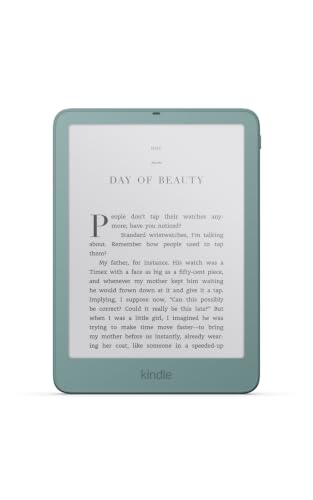
Amazon makes the Paperwhite in two versions, and the 2026 Signature Edition is the one with nicer materials, more storage and a few comfort features the standard model skips. It sits between the regular Kindle Paperwhite (2026) and the color-screen Colorsoft in Amazon’s lineup. This profile explains what you actually get for the step up, who benefits, and who would be paying for things they will not notice. For the full field of options, see our e-reader ranking for 2026.
A note on method: we compare published specifications and Amazon’s own descriptions. We have not taken any measurements of this device ourselves, and where Amazon has not published a number, we say so.
What Amazon Says About the 2026 Signature Edition
Amazon announced the refreshed Kindle lineup on October 1, 2026, with shipping starting October 28, 2026. According to the announcement, the Paperwhite Signature Edition has an aluminum rear housing, 32GB of storage, an auto-adjusting front light, double-tap page turning and pogo pin dock charging. It is thinner than the previous version, though Amazon does not give exact dimensions in the announcement. The announcement lists two colors: Graphite and Seaglass Green. The listing we picked for this profile is the Seaglass Green, 32GB model.
The screen is the same family as the standard Paperwhite, which Amazon describes as having the highest contrast ratio of any Paperwhite, built on an oxide thin-film transistor backplane. That matters because it tells you where the extra money does not go. The Signature Edition is not a sharper or larger screen than the Paperwhite. It is a more finished device around the same reading surface.
The Aluminum Back
The standard Paperwhite uses a plastic body. The Signature Edition swaps the rear housing for aluminum. Metal feels cooler and denser in the hand, tends to look more premium on a nightstand, and shrugs off the scuffs that plastic collects in a bag. Whether that is worth a premium is a personal call. Readers who use a cover all the time will rarely see the back of the device, while readers who carry the Kindle bare will notice it every day.
The announcement does not give a weight for either version, so we cannot say whether the metal back changes how heavy the device feels. If weight matters to you, look at the figures on Amazon’s product page before ordering.
The Auto-Adjusting Light
Every 2026 Paperwhite has a warm, adjustable front light. The Signature Edition adds an auto-adjusting light, which means the device changes brightness for you as the room gets darker or brighter. For someone who reads in different places during the day, such as a sunny kitchen in the morning and a dim bedroom at night, that saves a lot of tapping on the screen. If you read in the same chair at the same hour most days, the manual slider on the standard model is perfectly adequate.
32GB of Storage
The standard Paperwhite has 16GB, and the Signature Edition doubles that. For plain text books, neither figure will ever be a constraint, since a typical novel takes up very little space. Extra storage matters if you load a lot of audiobooks, which are large, or collections of comics and graphic novels, which are image-heavy. It also leaves room for personal documents. If you listen to audiobooks on your Kindle through Bluetooth headphones, the 32GB version is the safer bet.
Charging and Accessories
Amazon lists the Signature Edition with pogo pin dock charging. In plain terms, the Kindle has small metal contacts on the back that line up with a dock, so you can set it down to charge without plugging a cable into the device. According to Amazon’s announcement, the Signature Edition works with a Charging Dock and a Page-Turn Cover that are sold separately, and it also works with the Kindle Click remote. Amazon’s own buying guide describes the same feature as wireless charging, so treat the wording loosely and check the Amazon page for what is included in the box.
The page-turn accessories are the most interesting part for some readers. A cover or remote that lets you flip pages without lifting a finger makes the device more comfortable to use while eating, cooking or lying on your side. The Signature Edition also supports double-tap page turning on the device itself, according to Amazon.
We cannot tell from the pages we opened whether the Signature Edition carries the same waterproof rating as the standard model, so check that on Amazon if you plan to read in the bath or by the pool. The standard Paperwhite is described as waterproof in Amazon’s materials; see our Paperwhite profile for that discussion.
Who Should Buy the Signature Edition
The Signature Edition makes sense for:
- Heavy readers who use their Kindle every day and will notice the better build and the auto light.
- Audiobook listeners who want extra storage for Bluetooth listening.
- Gift-givers who want to give something that feels special. Seaglass Green does not look like the usual black or gray e-reader.
- Readers who plan to use page-turn accessories and want the device to support them fully.
- Anyone who dislikes fiddling with the light and wants the Kindle to adapt on its own.
Who Should Skip It
Skip the Signature Edition and buy the standard Paperwhite if:
- You mostly read novels in one or two places and are happy using the light slider.
- You want to keep the price of the device as low as possible.
- You carry your Kindle in a cover or case that hides the back.
- You are choosing a first e-reader for a casual reader. The standard model is already a very capable device.
If you want color for comics, picture books or highlights, go to the Kindle Colorsoft (2026) instead. If you want handwriting and notes, the Kindle Scribe is built for that. The Signature Edition does neither.
Signature Edition Versus Standard Paperwhite at a Glance
Based on Amazon’s announcement, here is how the two compare.
- Storage: 32GB on the Signature Edition, 16GB on the standard model.
- Rear housing: aluminum on the Signature Edition, with the standard model not described as aluminum.
- Front light: warm and adjustable on both, with auto-adjusting only on the Signature Edition.
- Page turning: double-tap on the Signature Edition; the standard model is not listed with that feature.
- Charging: pogo pin dock charging on the Signature Edition; Amazon does not specify a charging method for the standard model in the announcement.
- Colors: Graphite and Seaglass Green for the Signature Edition; the standard model is listed in Graphite.
- Screen: same family of oxide display, so reading quality should look similar.
The Value Question
In short, the Signature Edition is a premium trim, not a different product. If you can afford it and you are the sort of person who appreciates a well-built object, it is a pleasant upgrade that you will use daily. If you are cost-conscious, the standard Paperwhite has the same display and the same warm light. Since we do not list prices here, use the button below to compare the current pricing of both models on Amazon and decide whether the gap feels small or large to you. A useful rule of thumb: ask whether you would pay the difference for the auto light alone. If the answer is no, treat the other features as bonuses, not reasons.
Bottom Line
The 2026 Kindle Paperwhite Signature Edition is the Paperwhite for people who read a lot and want the extras: 32GB, aluminum back, auto-adjusting light, double-tap page turns and dock charging. It does not change the reading experience on the page, so shoppers who do not care about those extras lose nothing by choosing the standard model.
See price on Amazon
Sources