We earn a commission if you buy through our links, at no extra cost to you.
Best E-Reader for Adults Who Want a Big Screen
6 vs 7 vs 11 inches: how screen size, font and layout settings, weight and one-hand reading shape which big-screen e-reader suits an adult reader.
At a glance
For the biggest page, the Kindle Scribe (2025, 32GB) has an 11-inch screen and a pen, though it weighs 400g. The Kindle Paperwhite (2026) is the lighter step up from 6 inches. If you want color on a large screen, the Kindle Scribe Colorsoft is Amazon's 11-inch color option.
Plenty of adults decide an e-reader is too small after a few weeks of use. The page turns too often, PDFs are awkward or a graphic novel looks cramped. A bigger screen is one answer, but it has costs in weight and portability. This guide walks through the three sizes you will see on the market, 6, 7 and 11 inches, and then matches the models on our list to how you read.
We did not handle these devices ourselves. We compared the specs and announcements the manufacturers published, and where a number is missing from an official page, we say so.
What “Big Screen” Means in Practice
Screen size is measured diagonally, and it changes three things you notice every day: how many words fit on a page, how well the device handles anything that is not plain text, and how much it weighs.
- 6 inches is the paperback class. The 2026 entry Kindle and both Kobo Clara models sit here. According to Amazon, the 2026 Kindle is its most pocket-sized Kindle yet. These devices fit in a jacket pocket and are comfortable to hold in one hand for long stretches.
- 7 inches is the middle step. The Kindle Paperwhite (2026) and Kindle Colorsoft (2026) are 7-inch devices according to their Amazon listings. Amazon’s announcement calls the new Paperwhite display the largest Paperwhite display so far, though the page does not give the diagonal in inches.
- 11 inches is the page-sized class. According to Amazon, every model in the redesigned Kindle Scribe lineup has an 11-inch glare-free display with paper-like proportions.
Fix the Font First, Then Decide on the Screen
Before you buy anything larger, try the settings. On a Kindle you can change the typeface, the size, bolding, line spacing and margins. Kobo’s Clara pages describe changes to font size, margins and font style as well. For plain novels, these settings often solve the “too small” problem without a heavier device.
The catch is simple math. Large type on a small screen means fewer lines per page. On a 6-inch device, a big font may fill the page after a few paragraphs, and you will tap to turn the page more often. A 7-inch screen shows noticeably more at the same size, and an 11-inch screen shows far more, close to what a printed page offers. So if your main reason for a larger device is the type size you prefer, a 7-inch model is often the sensible middle. If the reason is PDFs, comics, sheet music or textbooks, screen size does more for you than any setting can.
Layout Settings That Matter on a Larger Page
- Margins. On an 11-inch screen, long lines of text are tiring to follow. Widen the margins to keep lines at a comfortable length.
- Line spacing. More space between lines helps on a large page, where the eye has a long way to travel back to the start of the next line.
- Bold and weight. Heavier text can make a smaller font easier to read without increasing the size.
- Orientation. Landscape suits two-column PDFs and wide images on a big screen. Portrait suits books.
Weight and One-Hand Reading
Weight is the price of screen size. Amazon states that the new Scribe design is 5.4mm thick and 400g, which is about 14 ounces. That is a thin device, but it is heavier than a typical paperback and well above a Paperwhite. You will often rest it on a table, a pillow or your lap rather than hold it out in one hand.
Amazon does not give a weight for the 2026 entry Kindle in the announcement we opened, only that it is lighter than the previous release. For one-hand reading in bed, on a commute or standing on a train, a 6-inch or 7-inch device is easier to live with. If you want an 11-inch screen and also read lying down, a case with a stand or a pillow solves most of the problem, but you should decide whether the trade-off is worth it.
Which Big-Screen Model Fits Which Adult Reader
The Reader Who Wants the Biggest Page and the Option to Write: Kindle Scribe (2025, 32GB)
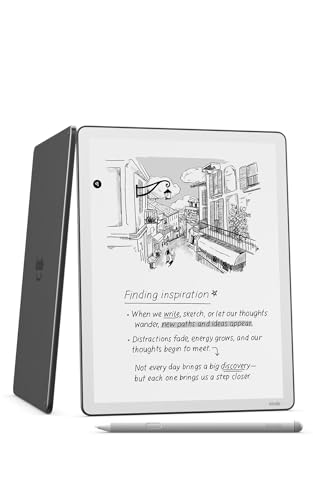
An 11-inch glare-free screen with a front light and an included pen. A fit for readers who want a page-sized display for books, PDFs and notes.
This is the large-screen Kindle in its plainest form. According to Amazon, it has an 11-inch display, a pen that attaches to the device and never needs charging, and notebook and document tools. You can import documents from Google Drive and Microsoft OneDrive and export annotated PDFs. The screen is black and white. Text looks generous at a comfortable size, and PDFs, textbooks with figures and sheet music are far easier here than on a 6- or 7-inch Kindle. The cost is size and weight: it is the most tablet-like device on our list. Read our Kindle Scribe (2025) profile for the details.
The Reader Who Wants More Than 6 Inches Without the Bulk: Kindle Paperwhite (2026)
A 7-inch flush-front, waterproof Kindle with a warm light. A fit for adults who want a larger page than a 6-inch device while keeping it light.
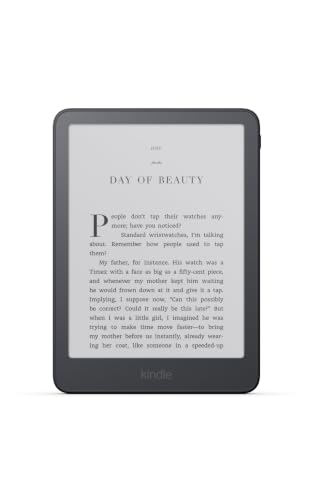
For most adults, this is the sensible next step up in size. The 2026 Paperwhite, per its Amazon listing, has a 7-inch display, and Amazon says it is thinner and lighter than the previous model, waterproof, with a warm adjustable front light and up to 12 weeks of battery. The flush-front design means the glass sits level with the bezel. It handles novels, library books and large-print settings well, and it is much lighter than an 11-inch device. It does not offer color or handwriting. Our Kindle Paperwhite (2026) profile goes through the features, and the Paperwhite Signature Edition profile covers the 32GB version with an aluminum back and auto-adjusting light.
The Reader Who Wants a Big Page in Color: Kindle Scribe Colorsoft
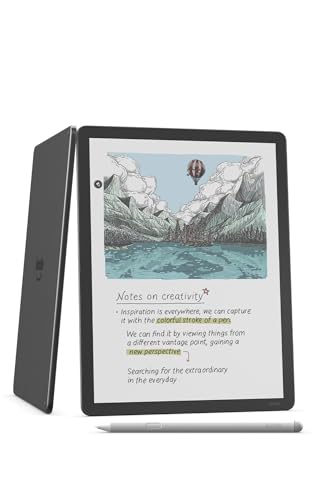
The 11-inch color E Ink Kindle with an included pen. A fit for readers whose books, PDFs or notes depend on color.
Amazon introduced the Scribe Colorsoft on September 30, 2025 as the first color Kindle Scribe. It has the same 11-inch size and design as the standard model, with 10 pen colors and 5 highlighter colors. Color is useful for comics, illustrated books and color-coded highlights in PDFs. The trade-off is physical: color E Ink looks softer and more muted than a tablet, and Notebookcheck reports that color resolution is lower than black-and-white resolution. It is also the most expensive model on our list. Our Kindle Scribe Colorsoft profile has the details.
Quick Comparison by Size
| Size | Models on our list | Best for |
|---|---|---|
| 6 inches | Kindle (2026), Kobo Clara Colour, Kobo Clara BW | Pocket carry, one-hand reading |
| 7 inches | Kindle Paperwhite (2026), Paperwhite Signature Edition, Kindle Colorsoft (2026) | More text per page, light weight |
| 11 inches | Kindle Scribe (2025), Kindle Scribe Colorsoft | PDFs, comics, textbooks, notes |
How to Choose
Start with what you read. If it is mostly novels and nonfiction in plain text, a 7-inch Paperwhite and a larger font setting will probably be enough. If it is lots of PDFs, sheet music, textbooks or large comics, the 11-inch Scribe is the one that changes what is possible. Add color only if color is part of the content.
Then think about where you read. If it is mostly in bed or on the move, weight and one-hand comfort should outweigh extra inches. If it is at a desk, in a chair or on a flight with a tray table, an 11-inch screen is easy to live with.
Finally, think about the ecosystem. The Kindle models read from Amazon’s store and work with library loans sent through an Amazon account. The Kobo models are all 6-inch and there is no big-screen Kobo on our list, which is why they appear only in the 6-inch row. See the full ranking in our best e-readers of 2026 comparison.
Sources
- New Kindle lineup 2026, Amazon announcement (October 1, 2026, aboutamazon.com/news/devices/new-kindle-lineup-2026)
- Amazon: redesigned Kindle Scribe lineup with the first color Scribe (aboutamazon.com/news/devices/new-amazon-kindle-scribe-color)
- Notebookcheck: Kindle Scribe Colorsoft wants to take on the reMarkable Paper Pro
- Kobo Clara BW official product page (Kobo US)
Frequently asked questions
Is an 11-inch e-reader too big for everyday reading?
It depends on where you read. According to Amazon, the Kindle Scribe is 5.4mm thick and 400g, which is about 14 ounces. That is heavier than a typical paperback and closer to a small tablet, so many readers prop it up or use two hands. It works well at a desk, on the couch or on a tray table; for reading in bed on your side, a lighter device is easier.
Can you just raise the font size instead of buying a bigger screen?
Often, yes. Kindles let you change typeface, size, bolding, line spacing and margins. The trade-off is that large type on a 6-inch screen shows fewer lines per page, so you turn pages more often. A 7-inch or 11-inch screen shows more at the same size.
What is the difference between a 6-inch, 7-inch and 11-inch e-reader?
Six inches is the paperback-sized, pocketable class, such as the 2026 Kindle and the Kobo Clara models. Seven inches is the Paperwhite and Colorsoft class, with more text per page. Eleven inches, the Kindle Scribe class, is closer to a printed page and suits PDFs, comics and textbooks.
Do you need the pen on a big-screen Kindle?
No, but the Scribe lines are built around it. Amazon includes a pen that attaches to the device and never needs charging. If you only read, the pen is a feature you pay for and may not use, and the Paperwhite is the less expensive route to a screen larger than 6 inches.
Is a color big-screen e-reader worth it?
Only if your reading uses color: comics, illustrated books, color highlights or color notes. Color E Ink is softer and more muted than a tablet, and Amazon's own specs for the Scribe lineup describe a color display built on a filter layer. For novels, black and white is crisper.
Does a bigger screen mean shorter battery life?
Not directly. Amazon gives up to 12 weeks for the 2026 Paperwhite and describes weeks of battery for the Scribe lineup without a single number. Figures depend on how long you read, how bright the light is and whether wireless is on, so treat them as ceilings.