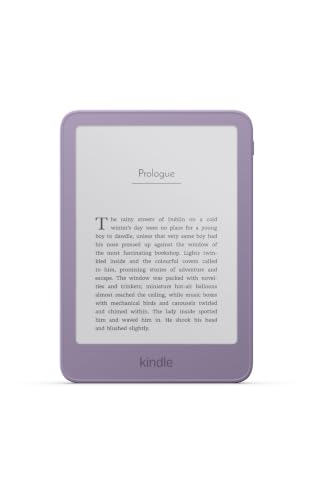
The Kindle (2026) is Amazon’s entry-level e-reader, refreshed in the company’s October 1, 2026 announcement alongside the new Paperwhite and Colorsoft. It is a 6-inch device built around one idea: to be the easiest, smallest and most affordable way to read Kindle books. This profile summarizes what Amazon says about it, how it fits into the lineup and who should pick it.
We did not handle the device ourselves. We compared the specs from Amazon’s announcement and organized them into a plain-English guide, noting where the announcement is silent. For the full ranking, see our guide to the best e-readers of 2026.
The Short Version
The 2026 Kindle is a good first e-reader and a good gift. It gives you the Kindle Store, a compact body and a long battery life. It leaves out the Paperwhite’s bigger screen and the extras that come with the Signature Edition. We rank it eighth of ten in our lineup, which says more about the strength of the models above it than about any weakness here. It is the right choice when simplicity and size matter more than screen size.
One caution: the Kindle (2026) shares a name with earlier basic Kindles, so always include the year when you compare listings. The product we cover here is the 2026 model, with the Ube or Graphite finish on the 16GB version.
Key Specs According to Amazon
These details come from Amazon’s announcement of the new Kindle lineup on October 1, 2026.
- Screen: 6-inch display with a flush-front design.
- Speed: Amazon says books open up to 30% faster than on the previous release.
- Battery: Up to 6 weeks of battery life.
- Size: Amazon calls it the most pocket-sized Kindle it has ever made, and says it is lighter. The announcement does not give a weight.
- Storage: 16GB on the standard model.
- Colors: Ube and Graphite.
- Aluminum version: A separate model with 32GB, in Alpine Sky Aluminum and Seaglass Green Aluminum.
- Availability: Amazon says the Kindle and the aluminum version were available starting the day of the announcement in the United States and a long list of other countries.
What the announcement does not say matters too. It does not give a screen resolution, does not mention waterproofing and does not describe the front light, ads or parental controls. For any of those, read the product listing for the exact variant you plan to buy. This is also a reason to be careful with older comparison charts, which may describe an earlier basic Kindle.
What 6 Inches Means in Daily Use
Six inches is the classic paperback-friendly size. The device fits in a jacket pocket or a small bag, and it is light enough to hold in one hand for long stretches. For novels, that is plenty. Text is the same E Ink experience as on bigger Kindles: no glare in sunlight, no notifications and no screen glow in the daytime.
The tradeoff is how much you see per page. Raise the font size and you will turn pages more often than you would on the 7-inch Paperwhite. If you read with large text, or if you find yourself zooming into PDFs and articles, the larger screen in the Kindle Paperwhite (2026) profile may be more comfortable.
Amazon’s emphasis on speed is useful for the same reason. A reader that opens books up to 30% faster than its predecessor feels less sluggish when you switch titles or jump to a library book. The figure is Amazon’s own, relative to the previous release, so treat it as a direction rather than a promise for every situation.
The Battery
Amazon quotes up to 6 weeks of battery life. As with all e-reader battery claims, it depends on how long you read each day, how bright the light is and whether wireless is on. A reader who goes through a few chapters a night will go a long time between charges. A reader who streams audiobooks over Bluetooth or keeps brightness high will charge more often. Either way, you are charging in weeks, not days, which is a major practical advantage of e-readers over tablets.
The Kindle Ecosystem
Choosing a Kindle means choosing Amazon’s store, its book catalog and its apps. If you already own Kindle books, they appear on the device. If you like to browse and buy with one click, it is hard to beat. Library borrowing also works: according to Libby’s help center, you can send most (not all) Libby books to a Kindle e-reader, in the United States only, through your Amazon account. Availability still depends on your library.
The flip side is lock-in. Books bought in the Kindle Store do not open on a Kobo, and Kobo books do not open on a Kindle. If you want a store outside Amazon or want library borrowing built into the e-reader, look at the Kobo Clara BW profile.
Kindle Kids Editions
Amazon’s announcement also lists Kids versions of the new Kindle. According to Amazon, they come with kid-friendly covers designed by real artists and 12 months of Amazon Kids+, with no notifications, no apps and no messaging. Amazon says the Kids edition of the Kindle was available to buy on the day of the announcement, and that a Kids edition of the Colorsoft was open for preorder in several countries.
We do not profile those 2026 Kids editions in this lineup. The kids’ models we do cover are the Kindle Kids (2024) and the Kindle Colorsoft Kids from 2025, and neither is described as the newest. If you are shopping for a child, compare them with the current Kids editions on Amazon. Our profile of the Kindle Kids (2024) lists what to look for.
Pros and Cons
Pros
- Small, light, pocket-sized design
- Up to 6 weeks of battery life, according to Amazon
- Opens books up to 30% faster than the previous release
- 16GB of storage in the standard model
- Full access to the Kindle Store
Cons
- 6-inch screen means more page turns than a Paperwhite
- Amazon’s announcement does not mention waterproofing or the front light
- No color
- Kindle Store purchases do not carry over to other brands
Who Should Buy It
The Kindle (2026) is for readers who want a simple, reliable device for novels and light nonfiction. It suits students on a budget, travelers who value size and anyone buying a first e-reader as a gift. It is also a natural replacement for an older basic Kindle.
It is not the right pick for readers who want a bigger screen, waterproofing, color or note-taking. For a larger display, see the Paperwhite in our lineup. For color, look at the Colorsoft. For writing, look at the Scribe models. If you are not sure, the comparison page walks through the options by budget and use.
What to Check Before You Buy
- Model year: Make sure the listing says 2026, since older basic Kindles are still sold.
- Ads: Check whether the listing is the ad-supported or ad-free version, as Amazon’s announcement does not discuss it.
- Water resistance: If you read in the bath or by the pool, confirm what the listing says.
- Storage: The standard 16GB model is plenty for most readers, and the aluminum version offers 32GB.
- Your existing books: Kindle books you own will appear on the device. Books from other stores will not.
You can see the current price and variants here: Kindle (2026) on Amazon. Buying through our link may earn a commission at no cost to you.
Sources